
If you live in the US, you can now use Polymarket legally through its regulated US platform, but the experience is a bit more “stock‑broker style” than the crypto‑degen version you might see on CT.
The key is understanding the difference between Polymarket US and the global site, what’s allowed, and how to actually get funds in and trade without breaking rules.
Let’s walk through it like you’re setting it up from scratch.
For a long time, US users were blocked or had to mess with VPNs to get on Polymarket, because the CFTC cracked down on its unregistered event markets in 2022 and forced it to stop serving Americans.
That’s changed: Polymarket acquired a CFTC‑licensed derivatives exchange and clearinghouse (QCX/QCEX) and received formal approval to relaunch in the US under federal regulation.
Practically, that means there is now a dedicated Polymarket US environment operated through a CFTC‑regulated entity where Americans can trade real‑money event contracts within the rules, rather than sneaking in via workarounds.
The CFTC approval comes with conditions: surveillance, reporting, and product limits, so the US product will be more conservative than the global one, especially around gambling‑style politics and sports markets.
Polymarket US vs “global” Polymarket
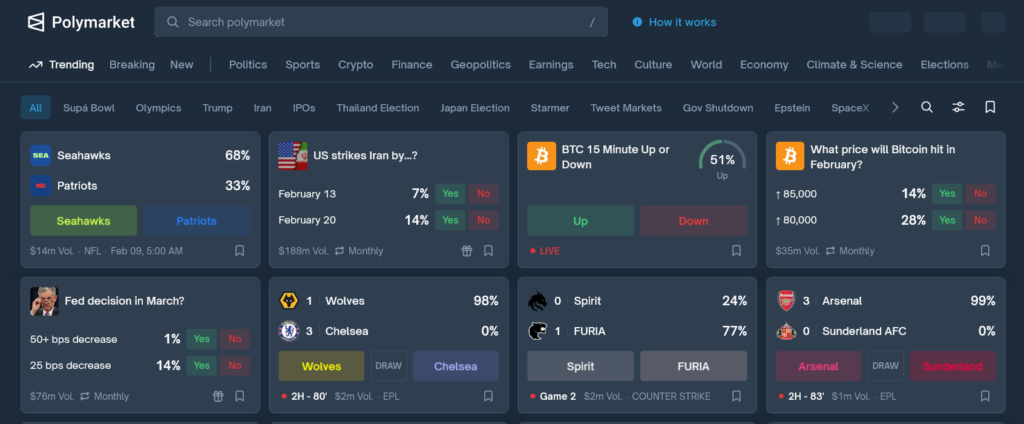
This is where a lot of confusion comes from: there are really two faces of Polymarket now. You’ll want to be very clear which one you’re using, because the rules, KYC, and even allowed markets differ.
Key differences
Here’s a simple comparison so you can keep them straight:
| Aspect | Polymarket US (regulated) | Global Polymarket (international) |
|---|---|---|
| Legal status for US residents | Federally legal via CFTC‑approved structure and licensed exchange/clearinghouse. | Historically geo-blocked to US; VPN usage to bypass is against Polymarket’s terms of service. |
| Regulator | CFTC, via QCX/QCEX as a designated contract market/clearinghouse. | Operates for non‑US users under separate entities, outside direct US derivatives oversight. |
| Account verification | Full KYC (ID, sometimes proof of address) and geo‑checks to confirm US jurisdiction and eligibility. | KYC requirements vary by country, but many non‑US users have traded with lighter or no KYC, depending on local law and product. |
| Access for US IPs | Officially supported; site routes you into the US‑compliant platform. | US IPs are restricted; VPN access, while technically possible, violates terms and risks account issues. |
| Funding & custody | Integrated with regulated intermediaries and futures commission merchants (FCMs), giving more traditional custody and reporting. | Heavier use of crypto rails and self‑custody wallets on the international side. |
| Market universe | Narrower set of CFTC‑compliant event contracts; products may phase in overtime. | Broader, more experimental markets in politics, macro, tech, etc., subject to local restrictions. |
As a US resident, the safest route is to stick to Polymarket US and avoid VPN‑based access to the international version, because it can breach both platform terms and US regulations.
Setting up a Polymarket US account (step by step)
Using Polymarket in the US now feels closer to opening a brokerage than just connecting a wallet. The process revolves around KYC and jurisdiction checks.
Step 1: Go to the correct site
Open Polymarket from a normal US connection (no VPN) so the platform can detect your region and route you properly.
Open Polymarket with this link
Disclosure: If you sign up or trade after visiting Polymarket through this link, I may earn a commission at no extra cost to you.
If your IP shows as US, you should see branding or disclosures for the US‑regulated environment (often mentioning QCX/QCEX or CFTC regulation in the footer or legal sections).
Step 2: Create an account
You’ll typically start with an email‑based signup or broker/FCM onboarding flow rather than a fully anonymous crypto wallet login.
- Providing your legal name, date of birth, and US address as they appear on your ID.
- Agreeing to risk disclosures and terms that spell out you’re trading event contracts under CFTC rules.
- Confirming you are not in a sanctioned or otherwise restricted category under US law.
Because you’re US‑based, expect this to feel similar to signing up for a regulated crypto exchange or futures broker.
Step 3: Complete KYC and geo‑verification
Polymarket and its intermediaries rely on identity verification to stay compliant. The typical KYC flow looks like this:
- Upload a government ID such as a passport, driver’s license, or state‑issued ID card.
- In some cases, upload a proof of address (utility bill, bank statement, or government letter from the last 3 months) that matches your account details.
- Take live photos or a selfie, if requested, to match your face to the ID.
Behind the scenes, the system will also run geo‑checks based on your IP and sometimes device signals to confirm you are in an allowed jurisdiction and not tunneling from somewhere restricted.
Verification often completes within roughly 24–48 hours, though times can vary.
Step 4: Link funding (USD or USDC, depending on setup)
Because Polymarket US runs through a CFTC‑regulated framework with intermediated trading, your funding method may look more like a futures account than a pure DeFi wallet.
Depending on the implementation, you might:
- Deposit USD via bank transfer or ACH to an associated FCM or broker account that then credits your trading balance.
- Or deposit stablecoins like USDC, with custody handled in a more institutional way than the purely global version.
Funding options are still evolving as Polymarket rolls out US infrastructure, so always check the current “Deposits” or “Funding” page for the latest supported methods.
Step 5: Understand the basic trading mechanics
Once funded, the core idea is the same as the international version: you’re trading “Yes” or “No” on real‑world questions, with prices between 0 and 1 (or 0 and 100 cents) representing probabilities.
In simple terms:
- A “Yes” share at 0.60 implies around a 60% market‑implied probability that the event will occur.
- If the event resolves “Yes,” that share settles at 1.00; if it resolves “No,” it settles at 0.00.
You can buy and sell these shares any time before resolution, so you’re not just betting on the final outcome, you’re also trading on changing odds.
Finding and trading markets from the US
Once your account is live, using Polymarket feels a bit like a prediction‑flavored version of a brokerage app. The US instance will highlight markets that have been structured to fit within the approved regulatory framework.
Browsing markets
You’ll typically see categories like:
- Politics and elections (subject to evolving CFTC rules).
- Macroeconomics (inflation prints, rate decisions, GDP releases).
- Technology and business (product launches, earnings‑related events).
- Legislation and regulation (bills passing, major policy decisions).
Some of the spicy international markets might not show up on the US side if regulators view them as off‑limits or too close to gambling, so don’t be surprised if your selection is narrower than what friends abroad see.
Placing a trade
A basic trade flow looks like this:
- Open a market and review the question wording and resolution criteria carefully.
- Choose “Yes” or “No” based on your view of the event and its implied probability.
- Enter the amount you want to risk or the number of shares you want to buy.
- Review the estimated maximum gain and loss, then confirm the order.
You can later close your position early by selling your shares back into the market if you want to lock in profit or cut losses before resolution.
Cashing out
When you’re done trading, you can withdraw funds back to your bank or off‑platform wallet, depending on how you funded the account.
Withdrawal processes will mirror standard regulated‑platform behavior: internal transfer from the trading account to a withdrawal balance, then a payout via ACH, wire, or crypto rails, subject to KYC and compliance checks.
KYC, VPNs, and what not to do from the US
Because you’re in a regulated environment, there are some important lines you don’t want to cross. This is especially relevant if you’ve watched older YouTube videos that teach VPN “workarounds.”
KYC and geo‑checks are not optional
Polymarket explicitly uses identity and geo‑verification to decide who can access which products. The help docs note that:
- KYC requirements vary by region but are a standard part of compliance.
- Documents include government ID and sometimes proof of address, and they need to be current and legible.
Verification policies can change as regulations evolve, so you should always check the official documentation for current rules.
Trading without completing KYC, or trying to misrepresent your location, can lead to restricted accounts and blocked withdrawals.
VPN access and why it’s risky for US users
Third‑party guides and VPN reviews often explain how to unblock Polymarket from restricted countries by tunneling your traffic through places where the site is open.
However, detailed availability guides explicitly state that using a VPN to bypass geo‑blocks violates Polymarket’s own terms of service.
For a US resident, that creates three layers of risk:
- You may end up accessing products not designed or approved for US investors.
- You could attract regulatory issues if authorities view your activity as evading US trading rules.
From a practical standpoint, now that a regulated US lane exists, there’s little upside to the VPN route versus just using Polymarket US properly.
Quick recap you can act on
If you’re in the US today and want to use Polymarket safely:
- Use the official Polymarket US route that sits on top of a CFTC‑regulated exchange and clearinghouse, not VPN workarounds to the global site.
- Complete KYC and geo‑verification with accurate information and proper documents.
Fund your account through the approved channels, then trade “Yes/No” event contracts just like you would trade contracts in a typical futures or prediction platform.
Stay within the rules: avoid VPN circumvention, respect product restrictions, and treat Polymarket as a regulated financial platform rather than a casual betting site
