


Connecting Coinbase to Polymarket takes under five minutes and gives you two distinct paths: a one-click exchange connection powered by a secure third-party bridge, or a manual USDC transfer straight to your Polymarket deposit address on the Polygon network.
Both methods fund your Polymarket balance in PUSD, the platform’s dollar-pegged stablecoin, with no deposit fee charged by Polymarket itself.
As of May 2026, Polymarket’s deposit flow has been updated following its April 28, 2026 exchange upgrade, which migrated the platform’s collateral token from USDC.e to PUSD.
The user-facing deposit experience is unchanged, but it’s worth knowing that whatever you send from Coinbase arrives as PUSD at a 1:1 rate, not raw USDC.
Key Takeaways
Here is what you need before starting:
- Polymarket offers a “Connect Exchange” button that links your Coinbase account directly, with no manual address copying required.
- The connection is brokered by Fun.xyz, a third-party bridge that never stores your Coinbase credentials and requires 2FA on every transfer.
- The manual transfer method (sending USDC on Polygon) is slightly cheaper but requires you to copy a deposit address and choose the correct network.
- Sending USDC on the wrong network, such as Ethereum mainnet instead of Polygon, risks permanently losing your funds.
- Polymarket does not charge a deposit fee. Coinbase may apply standard network or conversion fees depending on your account type.
What you need before you start?
You need a funded Polymarket account and a Coinbase account that holds USDC. If you don’t yet have USDC on Coinbase, you can convert any US dollars in your Coinbase balance to USDC at no fee directly inside the Coinbase app.
Coinbase also lets you sell other crypto holdings, such as ETH or BTC, for USD and then convert to USDC. For the non-custodial wallet side of Polymarket, a non-custodial Web3 wallet setup is only required if you plan to connect via MetaMask rather than through Coinbase directly.
US-based users must also complete Polymarket’s identity verification before making their first deposit. International users can deposit without KYC, though Polymarket does collect basic account information at sign-up via email or Google login.
Method 1: Connect Exchange (beginner-friendly, two minutes)
This is the path Polymarket recommends for users who are new to crypto or who want to avoid handling wallet addresses manually. The entire flow happens inside Polymarket’s deposit modal.
STEP 1: Log in to Polymarket and click Deposit in the top-right corner of the screen.
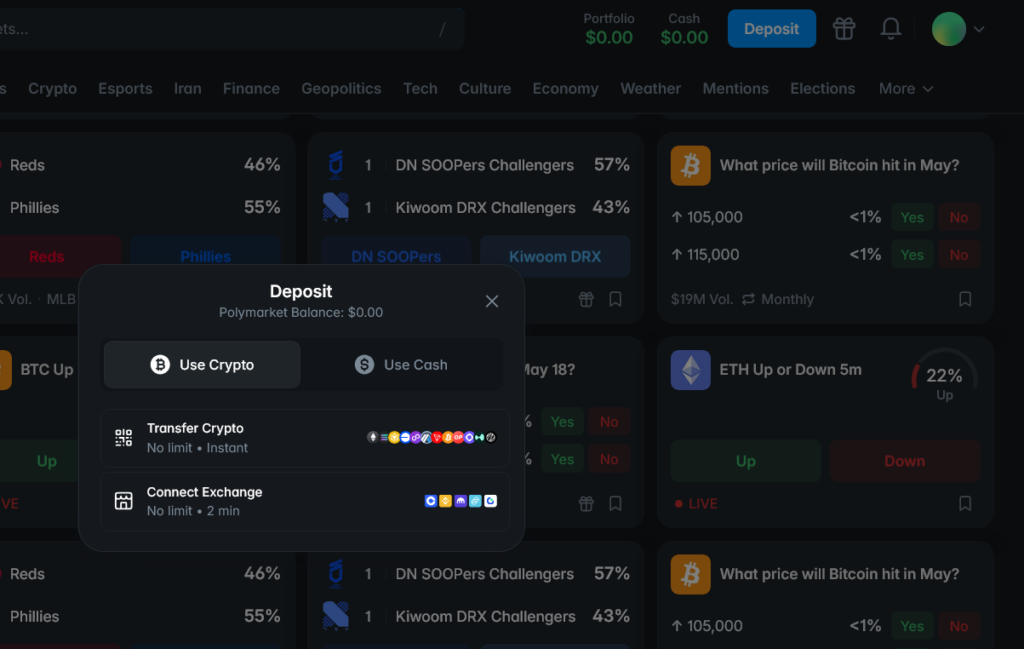
Make sure the Use Crypto tab is selected, then tap Connect Exchange.
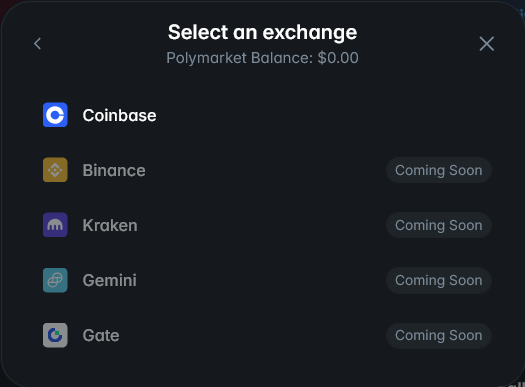
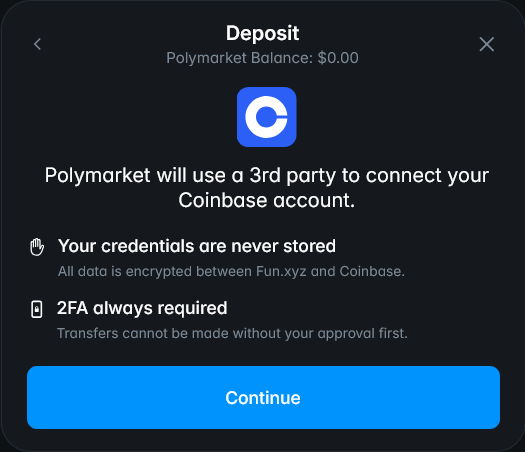
STEP 2: Select Coinbase from the list of supported exchanges. Polymarket routes this connection through Fun.xyz, a third-party bridge. Your Coinbase credentials are never stored by Polymarket or Fun.xyz, and 2FA is required on every transfer.
Click Continue and authorize the connection through Coinbase’s authentication screen. You will be redirected to Coinbase’s own authorization page, where you approve the link.
STEP 3: Choose the amount you want to transfer and confirm. Funds arrive in your Polymarket balance in approximately two minutes and are automatically converted to PUSD at a 1:1 rate.
This method has no deposit limit and is the simplest option when you want to avoid the network-selection step entirely.
Binance, Kraken, Gemini, and Gate.io integrations are listed as coming soon on Polymarket’s deposit page, but as of May 2026, Coinbase is the only exchange with a direct connect integration.
Method 2: Manual USDC transfer via Polygon (cheapest option)
If you prefer to control the transfer yourself, or if you already hold USDC on Coinbase and want the lowest possible fees, the manual transfer route is marginally cheaper. The key requirement is that you send USDC specifically on the Polygon network.
Sending on Ethereum mainnet instead of Polygon will still go through, but will trigger bridging and higher gas fees. Sending a different token, such as USDT or ETH, to your Polymarket deposit address will result in lost funds that Polymarket cannot recover.
- Log in to Polymarket and click Deposit.
- Under Use Crypto, tap Transfer Crypto.
- Select USDC as your token and Polygon as your chain. A deposit address will appear on screen. Copy it exactly, or scan the QR code.
- Open your Coinbase app. Navigate to your USDC balance and tap Send Crypto.
- Paste the Polymarket deposit address. When Coinbase asks for the network, select Polygon. If Polygon is not listed, select “Polygon (MATIC)” or “Polygon PoS” depending on Coinbase’s interface wording.
- Enter the amount and tap Send Now. Polymarket’s minimum deposit via this route is $3. Polygon gas fees are typically under $0.01 per transaction.
- Once the transaction confirms on the Polygon blockchain, your PUSD balance updates. This usually takes under one minute on Polygon.
A practical tip from using both methods: on your first transfer, send a small test amount, around $5 to $10, before moving a larger sum. Once that confirms and your Polymarket balance updates, you can send the rest with confidence.
Coinbase’s Polygon withdrawal screen sometimes defaults to “Ethereum” as the network, so it’s worth triple-checking the network field before hitting confirm.
Fees: what Coinbase and Polymarket each charge
Polymarket charges no fee to deposit. The cost, if any, comes entirely from Coinbase’s side and from the blockchain network itself.
| Method | Polymarket deposit fee | Typical network/processing fee | Arrival time |
|---|---|---|---|
| Connect Exchange (Fun.xyz) | None | Low (standard Coinbase network fee) | ~2 minutes |
| Manual transfer (USDC on Polygon) | None | Under $0.01 in gas | Under 1 minute |
| Manual transfer (USDC on Ethereum) | None | Variable gas, typically $1 to $5 | 1 to 5 minutes, plus bridging |
| Card on-ramp (MoonPay/Transak) | None | 2% to 4% processing fee | 5 to 15 minutes |
For users who plan to deposit regularly, the manual Polygon transfer is the most cost-efficient route over time, as the full Polymarket fee structure shows the real cost of active trading sits in maker and taker fees on executed trades, not in deposits.
The Connect Exchange route through Coinbase is functionally free for most users and worth the two-minute wait if manual address handling feels unfamiliar.
What happens to your USDC after it arrives
Since Polymarket’s April 28, 2026 exchange upgrade, the platform’s trading currency is PUSD, a standard ERC-20 token on Polygon backed 1:1 by USDC.
When your Coinbase transfer lands, Polymarket automatically converts it to PUSD at market rate. One dollar in equals one dollar of PUSD in your balance. The conversion carries no fee.
According to Polymarket’s April 28 upgrade notes, the 1:1 backing between PUSD and USDC is enforced by the smart contract rather than by a reserve managed off-chain, which means there is no fractional reserve risk.
If you withdraw later, your PUSD converts back to USDC at 1:1 with a small amount of slippage, typically around 0.08%, plus standard Polygon gas fees that are generally well under $1.
Before your first trade
Once your PUSD balance appears in Polymarket, you’re ready to trade. The first time you open a trade after the April 28 upgrade, Polymarket will show a one-time approval prompt asking you to authorize the new exchange contracts.
This is a standard on-chain signature and takes a few seconds. If you deposited via Coinbase Connect and later want to withdraw back to Coinbase, the reverse process is straightforward: withdraw USDC from Polymarket to your Coinbase wallet address on Polygon, then sell USDC for your local currency inside Coinbase.
For a broader overview of how the platform works once you’re funded, the Polymarket fee breakdown is worth reading before placing your first order, since maker and taker fees apply differently depending on whether your order sits on the book or takes from it.
Frequently Asked Questions
The questions below cover what readers ask most often when setting up this connection for the first time.
Is it safe to connect Coinbase to Polymarket?
The Connect Exchange integration uses Fun.xyz as an intermediary. Fun.xyz does not store your Coinbase login credentials, and every transfer requires 2FA authorization on your Coinbase account. Polymarket itself is a non-custodial platform, meaning your funds sit in a smart contract you control rather than in Polymarket’s own custody.
What network does Polymarket use for Coinbase deposits?
Polymarket’s underlying settlement layer is the Polygon network. When you use the manual transfer method, you must select Polygon as the sending network in Coinbase or your funds will either be lost or incur additional bridging fees. The Connect Exchange option handles the network selection automatically, which is one of its main advantages over manual transfer.
How long does it take for Coinbase funds to arrive on Polymarket?
The Connect Exchange method typically takes around two minutes from authorization to balance update. A manual USDC transfer on Polygon usually confirms in under one minute, since Polygon is a fast, low-fee layer-two network. Transfers sent on Ethereum mainnet take longer, typically one to five minutes, and may require an additional bridging step.
Can I use Coinbase Wallet instead of the Coinbase exchange?
Yes. Coinbase Wallet is a non-custodial mobile wallet that supports Polygon and holds USDC natively. You can connect Coinbase Wallet to Polymarket directly via WalletConnect, which appears in Polymarket’s wallet connection menu. This is different from the Connect Exchange option, which links your Coinbase exchange account rather than the standalone Coinbase Wallet app.
